While configuring my Airport Extreme:
![This configuration will cause your base station's status light to blink amber. Are you sure you want to continue? Click Ignore to prevent your base station's status light from blinking amber for this problem. [Skip] [Cancel] [Ignore]](https://wysz.com/wyszdom/wp-content/uploads/2008/01/amber-1.png)
Quite an odd message for what is probably the most common configuration. Oh well, at least it works! Plus I can now print from my couch. Sweet.
While configuring my Airport Extreme:
Quite an odd message for what is probably the most common configuration. Oh well, at least it works! Plus I can now print from my couch. Sweet.
“Being run over by a Zamboni would be flat-out cool.”
– The one and only Adam Lasnik
Here’s a simple recipe you can use if you’re having guests over for a party. It’s so simple that the video of me making it is less than five minutes long! It took 20 minutes of edited footage for me to make spaghetti.
As a side note, I plan on mastering future episodes in HD. However, I plan on keeping the podcast to an iPhone-friendly size only, as I don’t want to deal with managing an HD simulcast. If anybody has suggestions on how I could handle the issue of producing a podcast for multiple devices, please leave your ideas in the comments.
I’m writing this post with a fresh Internet connection. I was hoping this wouldn’t be a blogworthy experience, but you’re reading this.
I used to have Comcast. For unimportant and not terribly negative reasons, I decided to switch to DSL, since FiOS, which is what I really want, isn’t available in my building. In my area, it seems like AT&T is the best choice. Things started off pretty well. The ordering process was mostly straightforward, and I wasn’t that surprised to learn that ordering Internet without phone service would cause a bit of trouble, but not too much. They shipped me the modem, and there was no need for a technician to come to my apartment. I really appreciate this.
My service was scheduled to be available tonight after 8 PM, and around midnight I started the installation. Of course, it began with the dreaded installation CD. Maybe it’s just because I’m a Mac user, but I don’t understand why I need an installation CD for this. Just give me a list of settings, like… “Configure using DHCP.”
I didn’t see anything like that in the documentation, so I stuck in the CD. Fortunately my optical drive (which I hardly ever use) was behaving, and the disc included an OS X installer. For most of the “installation,” nothing was actually installed on my computer. It was just an application interacting with the modem via my Ethernet port. Fine. That’s understandable. But just when I thought I was finished, with little warning of what it was about to do, the installer opened a few scripts which did simply annoying things like adding bookmarks to my desktop, an arguably useful thing by setting my network preferences, but also some scary things like copying files to the Application Support folder, where they will probably hang out until the next time I do a clean install of my OS. The thing that freaked me out the most was when I saw it open Mail and attempt create a new email account. It completely butchered the settings, using my username as the incoming mail server, and naming the account after my password!
After that horrible process was over, I was online, and the connection so far seems snappy and stable. I checked the CD for an uninstaller, and there is none. If I were in a worse mood I’d call and complain to customer service, but that would go nowhere and I’m just not that surprised by what happened. It was easy enough to delete those desktop bookmarks that made my Mac look like a PC full of preinstalled trial programs, and I got rid of that email account which I’ll never use seconds after it was created.
The last time I had DSL I had to connect via PPPoE, so I’m happy that this time with DHCP getting the connection to my router should be plug-n-play, as long as the installer didn’t tie anything to my computer’s MAC address. I’ll update if that’s an issue.
Hopefully the rest of my experience will be smooth-sailing, but if you’re a Bay Area ISP and you have a painless installation process, feel free to get in touch with me. I already own cable and DSL modems.
Update: It looks like the damage was worse than I thought. When I tried to connect to my local wireless network today to throw some files over to my desktop, I realized that I couldn’t even turn my laptop’s Aiport on. Fortunately Apple’s discussion group was to the rescue again, and I found this post by Ryan Godfrey, which told me to create a new Airport service in the Network pane of System Preferences. Unfortunately the same problem recurred each time I would go back to the profile created by the installer. Deleting the AT&T profile seemed to fix things, and accessing the modem via a plain old DHCP Ethernet connection works just fine. What an unnecessary mess.
Update 2: I shared this post with AT&T and they got in touch with me to make sure all of my concerns were addressed. I told them that I just wanted my comments to make their way to whoever was in charge of the installation process. The representative promised that this will happen. If any new customers happen to see an improved installation, please let me know.
I have a new podcast episode available for your viewing pleasure. Thanks to Beah for the spaghetti sauce recipe.
I wish I could push these things out faster, but I’m editing on a computer that’s six years old, and I’m lazy. Hopefully I’ll upgrade my equipment in the nearish future so compression doesn’t take forever and I can edit in HD.
Here’s part 1:
And part 2:
I just saw Cloverfield. I’m not good at reviewing movies, but I had one question. At the beginning, I’m pretty sure the text indicated the recording was from an SD card. However, the way the recording plays indicates that it was recorded on linear media, since it bounces back and forth between the main recording and the stuff that was “taped over.” The characters also refer to a tape at the beginning, and there is a scene where they rewind and then don’t cue it back exactly right, leading to another glimpse of the taped over material. Just wanted to point that out.
I finally own a Wii. Arriving at 3:07 AM, I was second in line at the Sunnyvale Circuit City. The first guy got there at 2:30. Later in the morning we were told that there were only eight consoles available. The first eight of us got vouchers at 9:30 (30 minutes before opening) and could finally run to our cars to warm up.
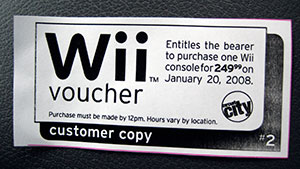
It was a cold and boring wait, but I figured if I could wait in line at a store for 13 hours with no intention of purchasing anything, I could wait in line for 7 hours to get a Wii.
I haven’t even opened the box yet; I went right to bed and didn’t wake up until my phone rang at about 5:45, and then went to dinner and saw Cloverfied. But since I’m now wide awake, tonight should be full of Wii fun.
One of the new iPhone features is the ability to create a WebClip, which is basically a bookmark you can put on the home screen that saves zoom data. If you create a WebClip of most pages, the icon is just a screenshot of the page. But, you may have noticed that some pages have custom icons when you clip them. If you want to do this for your own site, it’s pretty simple. Just create a 57×57 PNG file, name it apple-touch-icon.png, and put it at the root of your domain. If you want to specify an icon at the page level, check out Apple’s instructions.
If a user has created a WebClip before you added the icon, it looks like they’ll continue to see the screenshot until they delete it and create a new one. Same thing goes for updating an existing icon— a user will continue to see whichever icon was downloaded when the WebClip was created. Keep in mind that I determined this after about 3 minutes of testing, so it may be inaccurate.
This is my current icon:

And here’s what it looks like on an iPhone:

Update: There is some discussion on Apple-related sites about Apple’s recommended resolution. You may want to go with a 60×60 or perhaps even 129×129 PNG. We’ll see if Apple comes back with an official word on this.
These are my new shoes. They’re colorful and I love them. My Mom bought them for me.
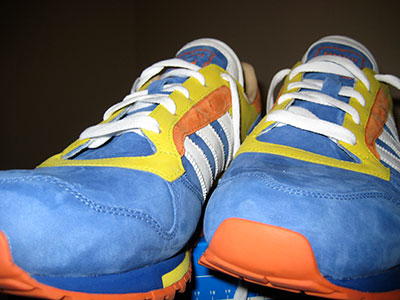
They got mixed (but positive) reactions at work. Share your thoughts in the comments.
I’d like to point out that this is the first picture I took with my Canon SD1000. I still have my Digital Rebel XT, but I really wanted a point-and-shoot for everyday adventures. So far, I love it, especially the responsiveness of the zoom when reviewing an image on the sizable screen.
Here’s my brief commentary on today’s announcements:
iPhone update
The Maps update with the location detection feature is pretty cool, and I can see it being useful in a city when I’m on foot and not with my in-car GPS. And using Wi-Fi data? I’ve never heard about that— that’s cool. After installing the update this morning I walked around work asking people if they needed to know where they are. I also tested it at every red light on the way home. It’s fast, and it’s precise enough to let you easily figure out which street you’re on. A nice treat is the page peel UI element. I don’t really care for it as a corny video transition or an annoying element in the corner of a web page, but in this case it makes sense and looks great. The graphics capabilities on this device are incredible. As far as Web Clips go, I’ve added Google Reader, WeatherBug, and Facebook. I’m looking forward to the apps that will come after the SDK release.
Apple TV
I wanted an Apple TV when it was first announced, but later decided against it because I couldn’t find a simple, legal way to acquire good HD content. Now I do. And without new episodes of the office being released, I haven’t been watching any HD content on my TV lately. As an added bonus, I don’t have to take sides in the expensive Blu-ray/HD DVD issue.
Time Capsule
It makes sense as a product, but I didn’t reach for my credit card immediately as in my apartment it’s not terribly inconvenient for me to just plug in to the USB drive sitting under my coffee table. However, my router has been acting flaky lately (I think it’s my router— I still have to rule out my Internet connection), so it looks like I have an excuse to buy! Since I’ll be backing up a 100 GB drive, I’ll just go for the 500 GB model.
MacBook Air
Yes, it is cool. Really really cool. Unfortunately, it’s not the computer I’m in the market for. If I didn’t already have a portable, I’d consider it, but since I already have a MacBook Pro and am looking to do some more video editing, I’m actually debating between an iMac and a Mac Pro.
Regarding the keynote itself:
When Steve mentioned the Mac Pro revision at the end, I was reminded how amused I get when they say “our most powerful Mac ever.” Any speed bump to the top of the line product would be the fastest ever! Maybe someday they should release a “slightly less powerful” Mac just for kicks. Stay tuned for Randy Newman’s performance at the end. I LOLed when he alluded to the Macbook Air leak.
Whenever I talk tech, please bear in mind my disclaimer.