I have been spoiled by a great feature of Safari. I usually start out working with one browser window full of tabs, and then at some point decide that I need to look at two pages at once. At that point, I just drag out one of the tabs to a new window. I use Firefox as least as much as I use Safari, and it bothers me every single day that I can’t do the same thing in both browsers. And while I’m sure that this functionality can be enabled with a Firefox extension, I’m not too excited about that solution since my previous experience with tab-enhancing extensions has yielded too much unexpected behavior.
I just completed a two-week period of only wearing glasses, and not contacts. I’m glad I did it, because after wearing glasses for an extended period of time, I’m no longer bothered by all of the distortion they cause, and will be more likely to wear them at night instead of leaving my contacts in longer than I should. But that’s not blogworthy.
What is blogworthy is the fact that this two-week training on my eyes has given me a bigger laptop monitor. You see with glasses, everything appeared smaller than I saw it without glasses (even with contacts.) I don’t know if that’s how it works for everyone, but that’s how I saw things. But after two weeks, I was used to the “small” world I was living in. Today, just after I had put my contacts back in, I picked up my laptop and noticed that everything looked huge! At first I thought my resolution or browser font size settings had been changed. As I looked around, I realized that wasn’t the case; the monitor itself appeared larger. I looked beyond my monitor, and saw that my TV had grown too! I think I’m going to go and look around for more “upgrades.”
Oh, and speaking of upgrades, if you use WordPress, it’s time for 2.5.1 (includes security fixes). You’ll want to subscribe to their blog to hear about future updates (thanks for the tip, Matt), so I don’t have to tell you here.
I know I picked on NBC in my previous post, but the truth is, I don’t think anyone has come up with a complete solution for online video. Not even Apple. I recently wanted to check out Juno, since I was told that I’d like it. It is available in iTunes, but for some reason not when I search on my Apple TV. I could download to iTunes, then sync to my Apple TV, but that’s just silly, and it wouldn’t be in HD anyway. Ok, I just checked as I was writing this… it’s available to buy in iTunes, but not to rent. Ugh. Why?
Maybe TiVo has some good stuff going, but I haven’t used one since living at home, because I don’t have cable now and I don’t think a TiVo would be worth it for the amount of TV I watch. I’m not interested in getting cable, since their HD is compressed to the point where it would annoy me too much. I’ve been impressed by the quality from FiOS, but my building isn’t wired for it. And I know Amazon has their Unbox thing, but I looked into it when it first came out and there was no Mac support.
So while I’m sure Apple and other services would point fingers at the studios, and the studios would have a short-sighted comment about piracy, I really don’t care whose fault it is. I just want to watch a movie.
I considered putting this in my “Annoying Marketing” category, but in this case I think they truly are just clueless.
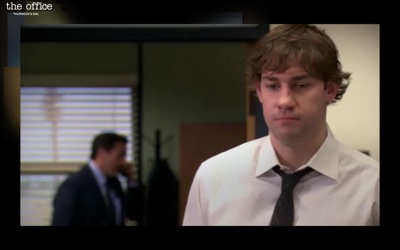
I was busy tonight and didn’t catch The Office while it was on TV. A year ago, this wouldn’t have been a big deal. I could just download it on iTunes the next day. In fact, it would be even better now since I could sync it to my Apple TV and watch it on the same screen I would have normally. Unfortunately, NBC has stopped selling their content on iTunes, so that is not an option. The next best thing I can do is get it on my computer, and hook that up to my TV, although that requires getting off of the couch. NBC does offer the ability to watch the episodes right on their website, but even if I went through the trouble of hooking up my computer, the image still wouldn’t be full screen. This is what “full screen” mode looks like on NBC.com:
See the unnecessary border? Annoying. And why do they have to promote the name of the show in the upper left corner? Obviously I am aware of the show; wouldn’t their marketing people want to put the NBC logo or something else there instead? I could put it in that mode and then make creative use of a the “zoom” accessibility feature ins OS X, but it’s hard to get it aligned just right.
I thought for a brief moment that I might be able to get a better, fuller-screen option of the show when I noticed that NBC now has a download option. But before I even clicked, I remembered NBC.com’s historically poor treatment of Mac users, and guessed that they don’t offer Mac support. I was right. According to their site, “Support for Apple and Linux systems will be coming in early 2008.” That’s a somewhat positive sign, but I personally would only consider Q1 to be “early,” and we’re now approaching the end of April. I’m sadly used to it, but this lack of Mac support is ridiculous, especially today when Apple’s consumer market share may be at 21% in the U.S. Its market share of consumers who have computers that actually work and like to do things with them like watch TV shows may be even higher.
I’d gladly pay for an HD download of The Office, but nobody is selling. Oh, and did you notice that the screenshot isn’t from tonight’s episode? That’s because it’s not available their website yet. It’s times like this that I consider going to the dark side and finding a nice high-quality HD download on the Internet. The same thing happens when I try to watch a DVD and get frustrated by the piracy warnings that they disable the skip buttons for. You know, the piracy warnings that only people who purchased the DVD get to see.
I wish an executive from every network would just sit down and listen to someone like Alex Lindsay for 5 minutes and trust that he knows what people want. But that probably won’t happen until it’s too late.
At the grocery store, I usually use a self checkout machine. Nothing against people; I just prefer machines in many cases. And I got freaked out at Trader Joe’s where the friendly cashier was commenting on everyone’s purchases. Machines don’t make me self-conscious.
Anyway, another thing I don’t do is cash. It’s clunky, dirty, and obsolete. I use a credit card. So when I check out, I have to sign one of those electronic signature pads with a stylus. But about a week ago, the styli disappeared from the pads. Someone (or some people) had yanked them from the cords and stolen them. What a ridiculous thing to steal. It’s nearly worthless beyond signing electronic pads. I guess that since thieves aren’t generally smart enough to get a job, it’s not surprising that they would end up stealing something useless. The funny thing is, if someone really did want a stylus, they could probably just ask someone at the front desk of Palm’s world headquarters, which is within walking distance of the store. But no matter the reason for the theft, I am now still terribly inconvenienced every time I check out. Nothing works besides the stylus… I’ve tried my finger and the metal clip on the end of the cord which used to hold the stylus. Nothing. This frustrating since I know that any little scribble will satisfy the machine. So, what I have to do is ask a human cashier to borrow the last remaining stylus, completely defeating the purpose of self-checkout.
Ok, finally, I think I figured this out. Recently, I read a security tip suggesting that I shouldn’t use my administrator account when I’m doing normal writing to the blog. So, I instead starting writing posts from an “author” account. Well, according to some fool, embeds fall outside of the restricted HTML that authors are allowed to use. A simple warning dialog would have saved me from so much frustration! Anyway, I’ve now promoted myself to an “editor,” so hopefully you should see me getting a strike below:
I’m having a ton of trouble embedding YouTube videos in my posts right now. Every time I click on “Save,” WordPress just deletes the embed code. What’s going on? Anyone else having problems (or solutions)?
If I get this to work (by trying over and over again), Ronald Jenkees should be jamming below.
If you already use an RSS reader, go ahead and skip this one. If you don’t know what RSS is, read on. Actually, forget reading, just watch this video from Common Craft:
Got it? Instead of wasting your time going through all of your bookmarks each day, not knowing if you’ll find anything new or not, you just check your RSS reader to see what’s new. It’s like email… you only check your inbox; you don’t check the “sent” folder of each of your friends to see if they’ve sent anything to you.
I did a presentation on this in school, but unfortunately it’s on my old computer which I don’t feel like plugging in right now. Common Craft fortunately says it about the way I like to explain it, so no worries.
When it comes to RSS readers, I used to use NetNewsWire, which is Mac-only. I’d just leave it running in the background all day (with no open windows), and whenever I got a new message, the Dock icon would update, just like Mail does for new emails (and now even RSS feeds, if you choose to show them in your inbox). I could even browse the headlines just by right-clicking on the Dock, without cluttering my screen with another open window. There was no time wasted checking for new items; I’d only interact with it if I knew there was something new. If you only follow a few sites, there’s not even really a need for a separate application; you can use Live Bookmarks in Firefox or simply bookmark an RSS feed in Safari. They’ll let you know what’s new.
About a year ago, I stopped using NetNewsWire and started using Google Reader(disclaimer) instead. The main reason behind this was that I now use multiple computers (including an iPhone) each day, so I needed an online solution that would keep the read/unread status of each item in sync across machines. I always have a web browser open, so the fact that it’s web-based isn’t really a problem, but I do miss the Dock icon functionality.